TL;DR Wispr Flow is an AI dictation app that converts your voice into polished text three times faster than you can type. Tap a button, speak normally — 'ums' and all — and clean text lands in any app. Email, SMS, Slack, ChatGPT, Buildxact, anywhere. For builders who do most of their thinking between site visits, in the car, or standing in a yard at 4pm, it's the highest-leverage $15 USD (~$23 AUD) you'll spend this month. Roughly an hour back, every day, on admin you'd otherwise do at the kitchen table after dinner. Also — finally — it actually works. No more screaming 'HEY SIRI' at a red light. Free tier exists. Google released a free offline alternative in April 2026. Apple's next iPhone will probably do something similar. Until then, this is the gap fix.
Published 3 June 2026 · Reading time: 8 minutes · Written by Ryan Ramsay, founder of BuildBrief
What is Wispr Flow?
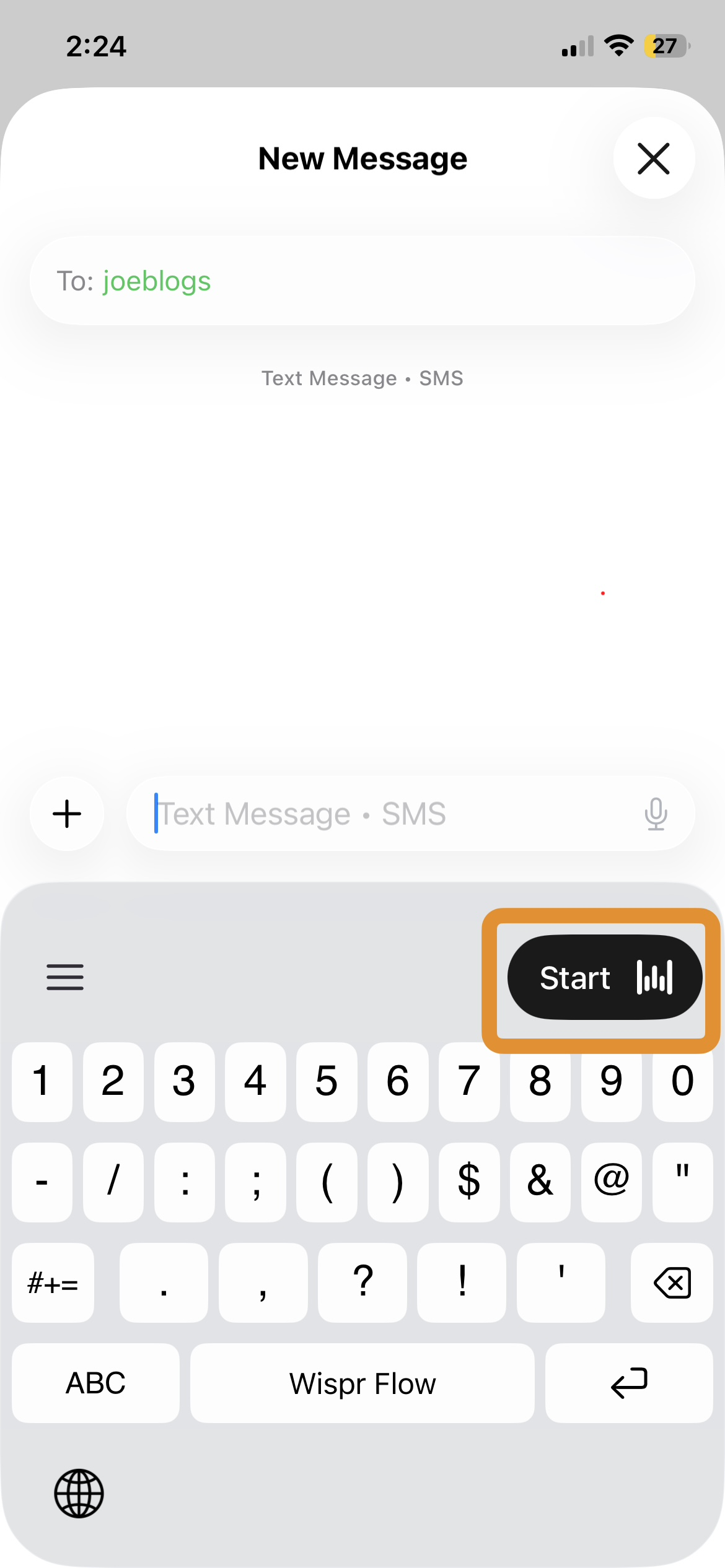
Wispr Flow is an AI-powered voice dictation app developed by Wispr AI (San Francisco, founded 2021) that converts speech to polished text across Mac, Windows, iPhone, and Android. You hold down a button (or tap an icon on your phone keyboard), speak normally — 'ums', restarts and all — and Wispr drops cleaned-up text into whatever app you're in. Email, SMS, Notes, ChatGPT, your CRM, Buildxact, anywhere there's a text field.
What separates it from your iPhone's built-in dictation is the cleanup. Built-in dictation transcribes exactly what you say, 'ums' and all. Wispr Flow understands you meant to say 'the variation for the bathroom' even when you actually said 'uh, the — the variation thing for the bathroom, you know'. It runs the raw transcription through an AI cleanup pass and gives you back text you can send without editing.
According to Wispr AI's own pricing page (verified May 2026), the Pro tier costs $15 USD/month or $144/year billed annually. A free Basic tier (capped at 2,000 words/week) exists for testing. One subscription covers every device, with settings, custom dictionary, and snippets syncing across them — rare in this category.
Finally — voice tech that actually bloody works
Picture this.
You're home. There's a pizza in the oven, 18 minutes on the clock. You grab the bloody phone to send one quick reply to your sparkie before dinner.
'Hey Siri, send a message to Dave.'
'I'm sorry, I didn't catch that. Did you say "send a massage to Dad"?'
No, Siri. No I did not.
'HEY SIRI. SEND A MESSAGE. TO DAVE.'
'Calling Mum.'
The pizza timer goes off. You've sent nothing. You burned 4 minutes and you still haven't replied to Dave. And if you'd managed to check today's NRL scores while you were at it, well — forget it.
This has been the state of voice tech for over a decade. Every iPhone keynote since 2011 has promised the future of voice. Every reality has been you, standing in the kitchen, yelling 'NO. STOP. NOT THAT. CANCEL!' at the bloody phone while dinner goes cold.
Same with Alexa. Same with 'Hey Google'. You'd ask Google to set a timer and it would helpfully open a Wikipedia article. You'd ask Siri to call 'the wife' and get a confused silence followed by a list of nearby Italian restaurants. The kids would laugh. The wife would not.
The whole industry has spent fifteen years telling us voice is the future while shipping voice tech that couldn't reliably understand a sober adult speaking clearly in a quiet room — let alone a tradie in a noisy ute trying to dictate a quote response between potholes.
And then, sometime in the last year or two, it just… started working.
Not 'Siri got slightly better'. Properly working. As in — you speak normally, like a human, with all the 'um's and 'yeah-look's and the sentence you start before realising you meant to start a different one — and the AI just gets it. Cleans it up. Hands you back text that sounds like you, except more articulate than you actually were.
That shift is the whole story behind tools like Wispr Flow. The underlying AI got good enough to understand humans the way other humans understand them. Including humans with a Bunnings cap on, a phone wedged between their shoulder and ear, and a half-eaten pie in their other hand.
About bloody time.
Is Wispr Flow worth it for builders?
Most 'productivity tools' reviews are written for people who sit at desks. Builders don't. Your week looks more like:
- 45 minutes in the car between sites in the morning
- An hour walking through someone's place doing a site visit
- 30 minutes back in the car typing replies to homeowners on your phone
- Another 90 minutes after dinner catching up on quote follow-ups
Three of those four windows are hands-busy. Two of them are when you're actually doing the work. The fourth — the after-dinner catch-up — is when you're tired and slow.
Here's the maths that makes Wispr Flow obvious:
- Mobile typing speed: ~40 words per minute on a phone keyboard (Karat et al., IBM Research; widely cited across mobile UX research)
- Conversational speaking speed: ~150 words per minute (American National Institutes of Health benchmark for conversational English)
Even allowing for AI cleanup time and the occasional re-prompt, voice gets you 2.5–3x faster than typing. For a builder doing 90 minutes of phone-keyboard typing a day, that's roughly an hour back. Every day.
That hour either goes back to your evening (more time with the family) or back to work (one more quote out the door). Either way, it's the cheapest hour you can buy.
Real builder use cases
This is where Wispr Flow earns its keep. Five situations every residential builder is in every week:
1. Replying to homeowner enquiries from the car
You finish a site visit at 11am. Sit in the ute. Phone's full of three new enquiries that came in while you were on site. You can either:
- Type three short replies on a phone keyboard with your sausage fingers (15 minutes, cramp setting in by reply two)
- Hold the Wispr button and dictate them naturally (5 minutes, eyes still on the windscreen wipers because of course it's started raining)
The text comes out clean. Not 'Hi Sarah, um, yeah look, I can definitely come and have a look, um, on Tuesday.' Just 'Hi Sarah, happy to come and have a look on Tuesday. What time suits?'
Three replies sent before you've put the ute in reverse. Try doing that with Siri.
2. Voice notes that become real quotes
Walking a job site with the homeowner. They're showing you the kitchen, the bathroom, the deck they want extended. Old way: pen and notebook, scribble while they talk, lose half of it. Newer way: voice memo on your phone, transcribe it later. Better way: open ChatGPT or Notes, hold Wispr, talk the whole walkthrough straight in as you go. By the time you're back in the car, you've got a clean scope summary ready to drop into your quote template.
We covered the voice-notes-to-Scope-of-Works workflow in an earlier article. Wispr Flow is the tool that makes that workflow work on your phone in real-time instead of after the fact at your computer.
3. Drafting variation notices on site
Something changes mid-build. You need to send the homeowner a variation notice before the day's out. You don't want to wait until you get home to type it. Pull out your phone, open your email or whatever you draft variations in, hold Wispr, and speak the variation naturally:
'The kitchen plan changed today — we found old wiring behind the splashback that needs a sparkie out before we can keep going. That's a one-day delay and an extra ~$680 for the electrical work. Need you to confirm by Friday so we can keep moving.'
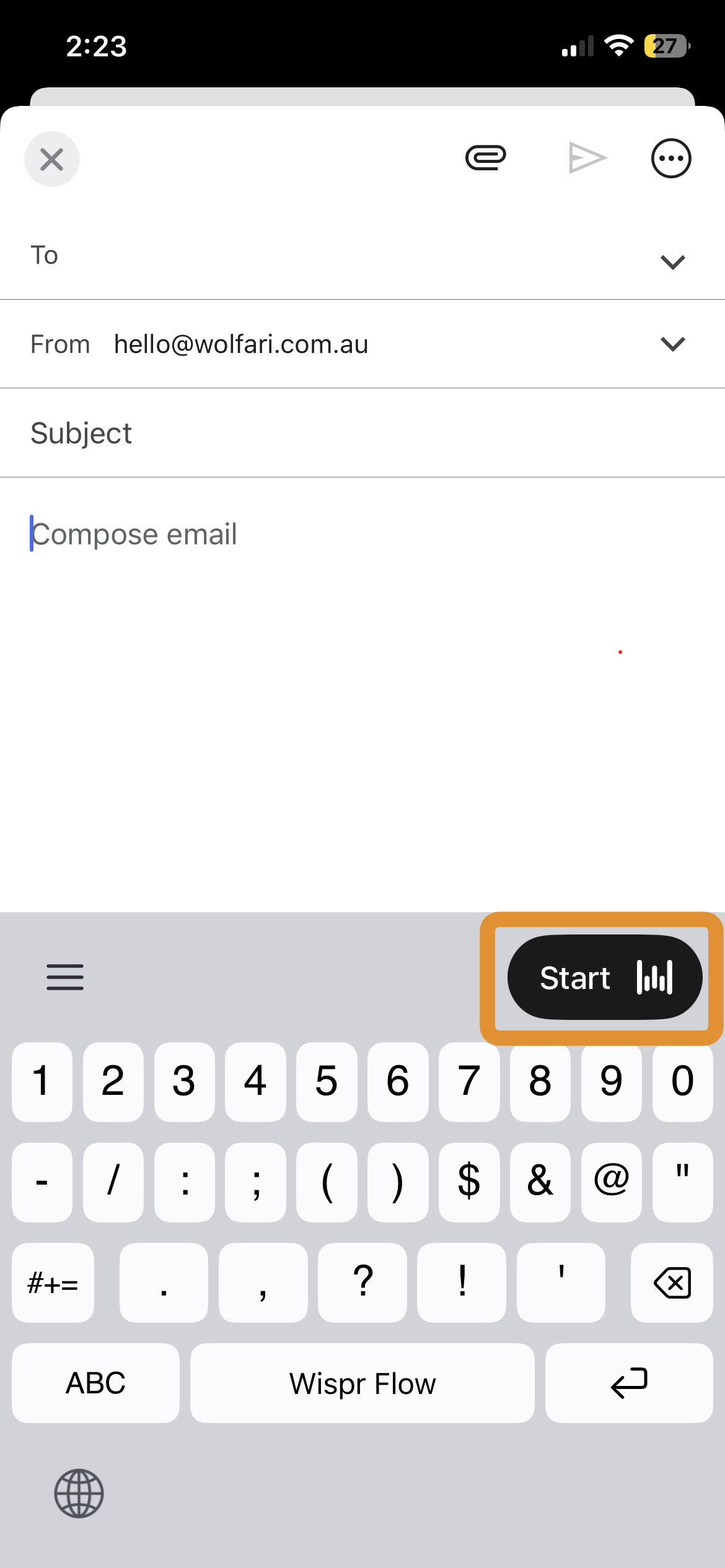
Wispr cleans it up. You read it once, send it. Done in 90 seconds instead of 10 minutes.
4. Briefing ChatGPT on the go
If you've set up an AI project for your business (covered in our 5-step AI setup guide), you're using ChatGPT or Claude regularly for quotes, scopes, and emails. Wispr Flow is the input layer that makes that practical on your phone.
Instead of typing 'draft a follow-up email to John from Camp Hill, polite but firm, asking about the deposit that was due last Friday' with your thumbs, you hold Wispr, speak the request, and ChatGPT gets a clean prompt. Saves a couple of minutes per AI interaction, which adds up fast when you use it 10+ times a day.
5. Capturing thoughts before they evaporate
Driving home, you remember three things: timber order for the Toowong job, follow up with the tiler about the Tuesday delivery, and that Sarah at Camp Hill wanted to know about appliances. Pull over, hold Wispr, dump all three into a notes app. By the time you're home, you have a to-do list.
Before Wispr, those three things lived in your head, got lost between the carpark and the front door, and surfaced again at 11pm when you couldn't sleep. Now they're written down and the brain shuts up.
The honest pros and cons
What Wispr Flow does brilliantly
- Speed. 2.5–3x faster than typing on a phone keyboard, no exaggeration
- Cleanup. The AI rewriter handles 'ums', restarts, and run-on sentences. You speak naturally; clean text comes out
- Cross-device sync. One subscription, all your devices. Dictionary, snippets, and settings sync
- Australian accent handling. Far better than older dictation tools. It knows 'tradie', 'subbie', 'sparkie' without you having to add them
- Works in any app. Email, SMS, Slack, Buildxact, Notes, ChatGPT — anywhere there's a text field, Wispr works
- Strong mobile reviews. Wispr Flow holds a 4.8/5 rating across 8,500+ ratings on the iOS App Store (verified May 2026) — the mobile experience is genuinely well-built
What's not great
- It needs internet. No offline mode. According to Wispr AI's privacy documentation, all audio is processed in the cloud via subprocessors including OpenAI, Anthropic, AWS, and Cerebras. Patchy reception on a remote site means patchy Wispr. This is a real limitation
- Desktop reliability is mixed. Wispr Flow holds a 2.7/5 rating on Trustpilot (May 2026), with most complaints focused on Windows performance and battery drain on desktop. The mobile experience is what most builders should care about, and that's solid — but if you're hoping to use it heavily on a laptop, test the free tier first
- It's a subscription. $15 USD/month (~$23 AUD), or $12 USD/month if you pay annually. A one-time purchase would be nicer, but they don't offer one
- You pay even on the months you barely use it. Easy fix — cancel and resubscribe seasonally if you have quiet months
What's actually a non-issue
The privacy concern. Wispr processes your voice in the cloud, which sounds scary but matches every cloud-based AI tool out there. They offer a 'Privacy Mode' on the Pro tier that means your dictation isn't stored or used for training. Turn that on and you're fine. (The same redaction principles from the AI privacy guide for builders still apply — don't dictate full contracts with real client names.)
Cost breakdown for Australian builders
| Plan | USD price | Approx. AUD/month | What you get |
|---|---|---|---|
| Basic (Free) | $0 | $0 | 2,000 words/week — enough for casual use, will run out fast for regular use |
| Pro (Monthly) | $15/mo | ~$23 | Unlimited words, Command Mode (Mac/Windows), priority support |
| Pro (Annual) | $144/yr | Same as Pro Monthly, billed yearly, 20% cheaper |
The free tier is enough to test it for a week. After that, if you're using it for any real work, the 2,000 words/week cap will burn through in two or three days. The Pro tier is the realistic choice for daily use.
Compared to what you'd save: if Wispr saves you one hour a day, and your effective hourly rate as a builder is anything above ~$23/hour, it pays for itself on day one of the month and prints time for the remaining 30. The maths is honestly not close.
What's coming — the free alternatives angle
Worth being straight about this: the AI dictation space is moving fast, and Wispr Flow probably won't have a monopoly on this for long.
Google released a free offline iPhone dictation app called Google AI Edge Eloquent in April 2026. No subscription, no usage cap, processes everything on-device (which means it works without internet — useful for remote sites). It does most of what Wispr does. The catch: it's brand new, currently iOS-only, and doesn't quite match Wispr's polish yet. But it's free and getting better.
Apple's next iPhone release will almost certainly include enhanced native dictation. Apple's been visibly behind on AI features and the next iOS version is widely expected to close that gap, including built-in dictation with cleanup. If/when that lands, paying for a dictation app gets harder to justify.
Wispr Flow vs the alternatives at a glance
| Feature | Wispr Flow Pro | Google AI Edge Eloquent | Apple Dictation (built-in) |
|---|---|---|---|
| Cost | $15 USD/mo (~$23 AUD) | Free | Free |
| Released | 2023 (Pro tier) | April 2026 | Built-in since iOS 5 |
| Platforms | Mac, Windows, iOS, Android | iOS only (Android promised) | iOS, macOS |
| AI cleanup of 'ums' & restarts | Yes — polished output | Yes — on-device Gemma model | No — verbatim only |
| Works offline | No — cloud-only | Yes — on-device | Partial (newer iPhones) |
| Australian accent handling | Strong | Strong | Mediocre |
| Works in any app | Yes — system-wide | Yes — keyboard | Yes — keyboard |
| Custom vocabulary | Yes — synced across devices | Yes — imports from Gmail | No |
| Privacy (no data retention) | Pro tier opt-in | Native — on-device | Native — on-device |
| Best for builders who… | Want it working reliably today across all devices | Want a free alternative right now and only use iPhone | Are happy with verbatim text and willing to edit |
Reading this table: if you're an iPhone-only builder who doesn't mind a slightly rougher experience, Google AI Edge Eloquent is genuinely free and decent. If you want polish, multi-device sync, and a tool that 'just works' today across phone and laptop, Wispr Flow is worth the $23 AUD/month. Apple's built-in dictation is the baseline both are trying to improve on, and it's not enough for any builder doing real volume.
So why pay $23 AUD/month now?
Because the gap between 'Wispr works today' and 'the free alternative is good enough' is real, and it's worth real money to live on the right side of that gap for the next 6–18 months. By the time Apple's free version is genuinely as good, you've already saved 100+ hours. Subscribe, get the hours back now, and cancel when the free option matches it.
Frequently asked questions about Wispr Flow for builders
Is Wispr Flow worth $15 USD per month?
Yes — for any builder who spends more than 20 minutes a day typing on a phone keyboard (emails, SMS, scope notes, follow-ups), Wispr Flow pays for itself within the first day of each month. The maths: voice input averages around 150 words per minute versus 40 words per minute typing on a phone, giving a 2.5–3x speed gain. For a builder doing 30 minutes of phone typing daily, that's roughly an hour reclaimed every day for $23 AUD per month. At any builder hourly rate above $23/hour, the tool is profitable immediately.
How much does Wispr Flow cost in Australia?
Wispr Flow Pro costs $15 USD per month, billed monthly, or $144 USD per year ($12 USD/month equivalent) billed annually. In Australian dollars at current exchange rates that's approximately $23 AUD/month or $225 AUD/year. A free Basic tier exists with a 2,000-word-per-week cap. There is no one-time purchase option. New accounts get a 14-day Pro trial with no credit card required.
Does Wispr Flow work on iPhone?
Yes. Wispr Flow runs on iOS, Android, Mac, and Windows with one subscription covering all devices. The iPhone app currently holds a 4.8/5 rating across 8,500+ ratings on the iOS App Store (May 2026 verified). It installs as both a standalone app and a keyboard extension, so it works in every text field on the phone — Messages, Mail, ChatGPT, third-party apps. The mobile experience is consistently rated higher than the desktop apps.
Is Wispr Flow better than Apple's built-in iPhone dictation?
For anything beyond verbatim transcription, yes. Apple's built-in dictation transcribes exactly what you say — 'ums', restarts, and grammar slips included. Wispr Flow runs the raw transcription through an AI cleanup pass and produces text you'd actually send without editing. For short voice commands or quick notes, Apple's free dictation is sufficient. For drafting emails, scope notes, or anything you'd put your name on, Wispr Flow's output is meaningfully better.
What's the free alternative to Wispr Flow?
Google AI Edge Eloquent (released April 2026) is the closest free alternative. It's iPhone-only currently, processes everything on-device (so it works offline), and applies AI cleanup using Google's on-device Gemma model. It does most of what Wispr Flow does. The trade-offs: no cross-device sync, less polished interface, and limited to iOS for now. For Android or desktop users, there is currently no equivalent free tool.
Does Wispr Flow handle Australian accents?
Yes. The current generation of AI dictation (including Wispr Flow) handles Australian English well. Common Australian building terms — 'tradie', 'subbie', 'sparkie', 'chippy', 'tile', 'battens' — transcribe accurately without requiring custom vocabulary additions. Older dictation tools (pre-2024) struggled with Australian phrasing; current tools do not.
Will Apple replace this with a free native feature?
Probably, but not soon. Apple has consistently lagged on consumer AI features, and the timeline for Apple Dictation to match Wispr Flow's cleanup quality is at minimum 6 months and likely 12–18 months. In that window, paying for Wispr Flow and saving roughly an hour a day represents real economic value (180+ hours over six months at any builder hourly rate). The argument for waiting only works if your typing volume is low.
Can I use Wispr Flow with ChatGPT or Claude?
Yes — this is arguably the highest-leverage use case for builders. Wispr Flow operates system-wide, so you can voice-input prompts into ChatGPT, Claude, or Gemini exactly the same way you'd type them. For builders who've set up an AI project for their business (see the 5-step AI setup guide), Wispr Flow becomes the input layer that makes AI workflows practical on a phone instead of forcing you back to a laptop.
Do I need to be technical to set up Wispr Flow?
No. Setup takes approximately two minutes: download the app from your platform's app store, grant microphone permission, install the keyboard extension on iPhone or Android, and hold the dictation button to start. There are no settings to configure, no learning curve, and no menus to navigate. If you can text, you can use Wispr Flow.
How to try it
- Go to wisprflow.ai and download the iPhone app (or Mac/Windows/Android if you prefer)
- Sign up — you get a 14-day free Pro trial with no credit card needed (referral code RYAN8769 gives you an extended trial)
- Spend 30 seconds setting it up — install the keyboard, give it microphone permission
- Use it for everything for a week — emails, SMS, voice notes, ChatGPT prompts
- By day 7 you'll know if it's worth $23/month for you
If it's a no, you've lost 14 days. If it's a yes — and for most builders it will be — you've just found an hour a day.
Bottom line
Voice tech has been a joke for fifteen years. Anyone who's grabbed the bloody phone to send one quick message and ended up calling Mum instead knows what I'm talking about. Wispr Flow is the first one that actually does what voice tech was always supposed to do.
If you spend any real time typing on a phone keyboard for work — emails, messages, scope notes, anything — Wispr Flow is the cheapest hour-saver on the market right now. It's not perfect. It's not free. It's going to face free competition soon. None of that changes the fact that for the next 6–18 months, it's the highest-leverage productivity buy a builder can make.
$23 AUD a month, an hour back every day, no contract. Hardest part is remembering to use it for the first week. After that, you'll wonder how you ever typed anything on a phone with your thumbs.
What to do next
- If you want to try it: wisprflow.ai — 14-day free trial, no credit card (use code RYAN8769)
- If you want the free alternative: Google AI Edge Eloquent on the iPhone App Store
- If you want to put Wispr to work with AI: combine it with the 5-step AI setup guide — Wispr becomes the input layer for ChatGPT, Claude, or Gemini
- If you want the voice-notes-to-scope workflow specifically: Voice Notes to Quote: Turning a Site Visit Walk-Through Into a Scope of Works Using AI covers the full process for using voice on site
About the author
I'm Ryan Ramsay, founder of BuildBrief, a lead-qualification platform built for Australian residential builders. I'm not a builder myself — I spend my time talking to builders about where their week actually goes, then building tools and writing guides that win those hours back. I've been using Wispr Flow daily for the past few months and was sceptical of dictation tools generally before that. This is the first one that's stuck.
More practical AI guides for Australian builders on the BuildBrief AI Tips and Tricks blog.
New article every fortnight. Join the waitlist to get them in your inbox.