TL;DR An AI project is a workspace inside ChatGPT, Claude, or Gemini that remembers your business across every chat. Most builders skip the setup, get generic answers, and quit by week two. The 5-step setup below — start a project, let the AI interview you, save custom instructions, upload real examples, add behaviour rules — is 20 minutes once. After that, every reply sounds like you wrote it. Works on free plans. Same principles across every major AI.
Published May 2026 · Reading time: 9 minutes · Written by Ryan Ramsay, founder of BuildBrief
What is an AI project?
An AI project is a persistent workspace inside an AI tool (ChatGPT, Claude, or Gemini) that holds custom instructions, uploaded files, and conversation memory specific to one purpose. A regular chat forgets everything the moment you close the tab. A project doesn't. It knows who you are, what your business does, and the documents you've uploaded — every time.
Think of it as briefing a new apprentice once, then never having to brief them again. ChatGPT calls them Projects. Claude calls them Projects. Google Gemini calls them Gems. Microsoft Copilot calls them Agents. Same thing, different names.
Why most builders quit AI before it works
Every builder who's tried AI has had the same first experience. Open ChatGPT, type 'write me a quote for a kitchen reno', get something generic and full of 'transformative design solutions' — words you'd never say to a real client. Close the tab. Don't go back for six months.
That's not the AI's fault. It's the same as handing a tape measure to someone who's never been on site and saying 'go quote this job'. Of course they get it wrong. They don't know your trade, your tone, your clients, your prices, or your standards.
From conversations with builders across Queensland, NSW, and Victoria running businesses between $500k and $5M turnover, the pattern's the same: most who try generic ChatGPT prompts give up within a week. The gap between trying and adopting is the setup. The fix isn't a better AI — it's briefing the one you've got, once, properly, and reusing that brief every time.
Five steps. About 20 minutes. After that, every conversation knows who you are.
AI Project vs. Regular Chat: Why the Setup Matters
| Feature | Regular Chat | AI Project |
|---|---|---|
| Remembers your business between conversations | No | Yes |
| Custom instructions always active | No | Yes |
| Document uploads persist | No (single chat only) | Yes (across all conversations) |
| Conversation history searchable | Limited | Yes |
| Available on free plans | Yes | Yes (ChatGPT, Claude, Gemini) |
| Setup time | None | ~20 minutes once |
| Quality of output for builder tasks | Generic | Personalised to your tone, region, business |
The setup time is the only cost. Everything below is the payoff.
Step 1 — Create an AI Project (Not a Chat)
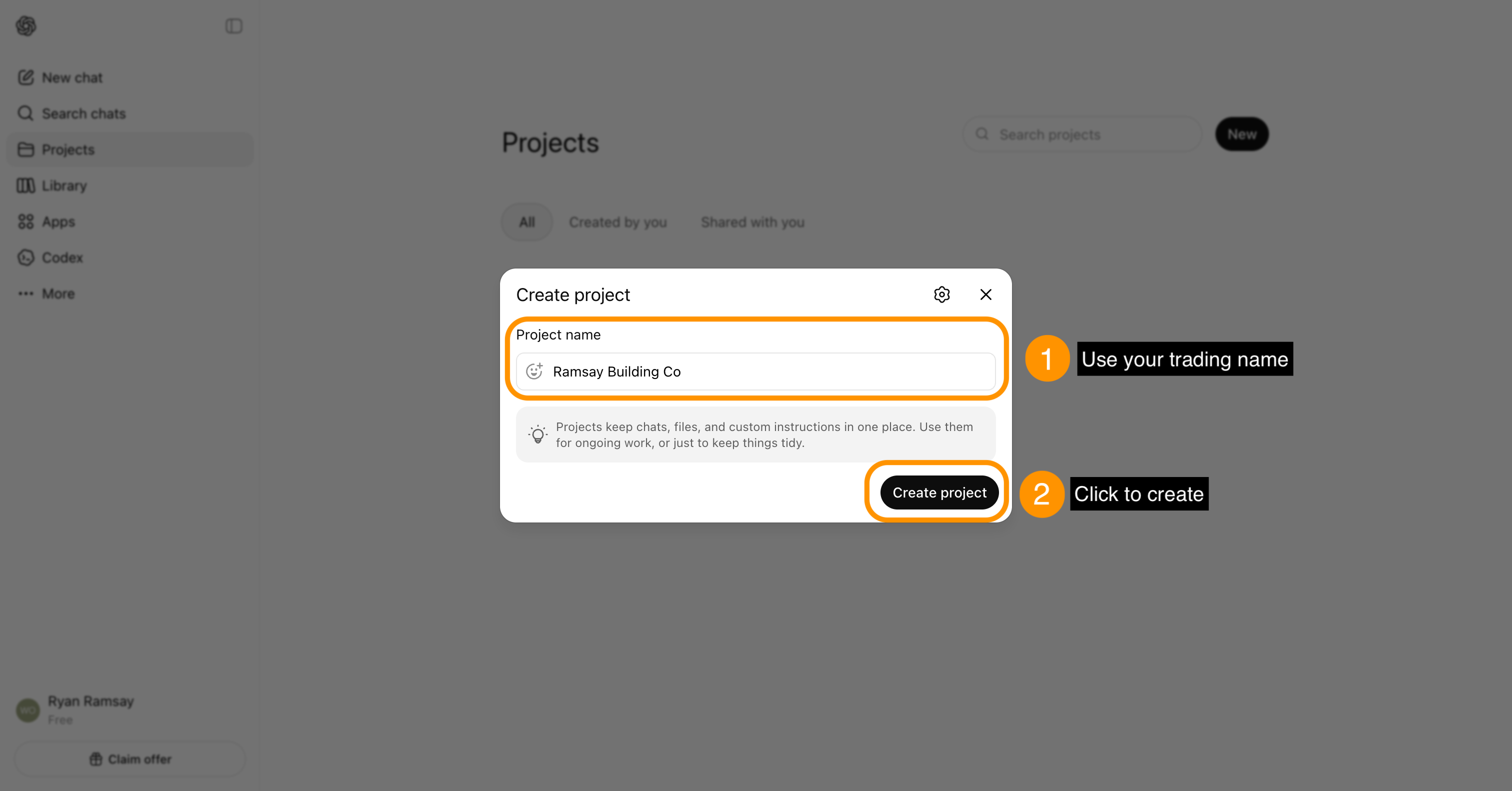
Every modern AI has a workspace feature with persistent memory:
- ChatGPT Projects — free and paid plans. Click the '+' next to 'Projects' in the left sidebar. Name it your trading name.
- Claude Projects — free and paid plans. Click 'Projects' in the sidebar, then 'Create Project'.
- Google Gemini Gems — free with a Google account. Open 'Gems Manager' from the side panel, click 'Create new Gem'.
- Microsoft Copilot Agents — included with Microsoft 365 Copilot. Use 'Create an agent' from the Copilot interface.
If your current AI doesn't have a project feature, switch to one that does. Briefing an AI that forgets you every time you close the tab is a waste of time.
The only rule for Step 1: Every conversation from now on happens inside the project. Never in the main chat window.
Step 2 — Let the AI interview you
This is the step most builders skip. It's also the highest-leverage 10 minutes you'll spend on AI all year.
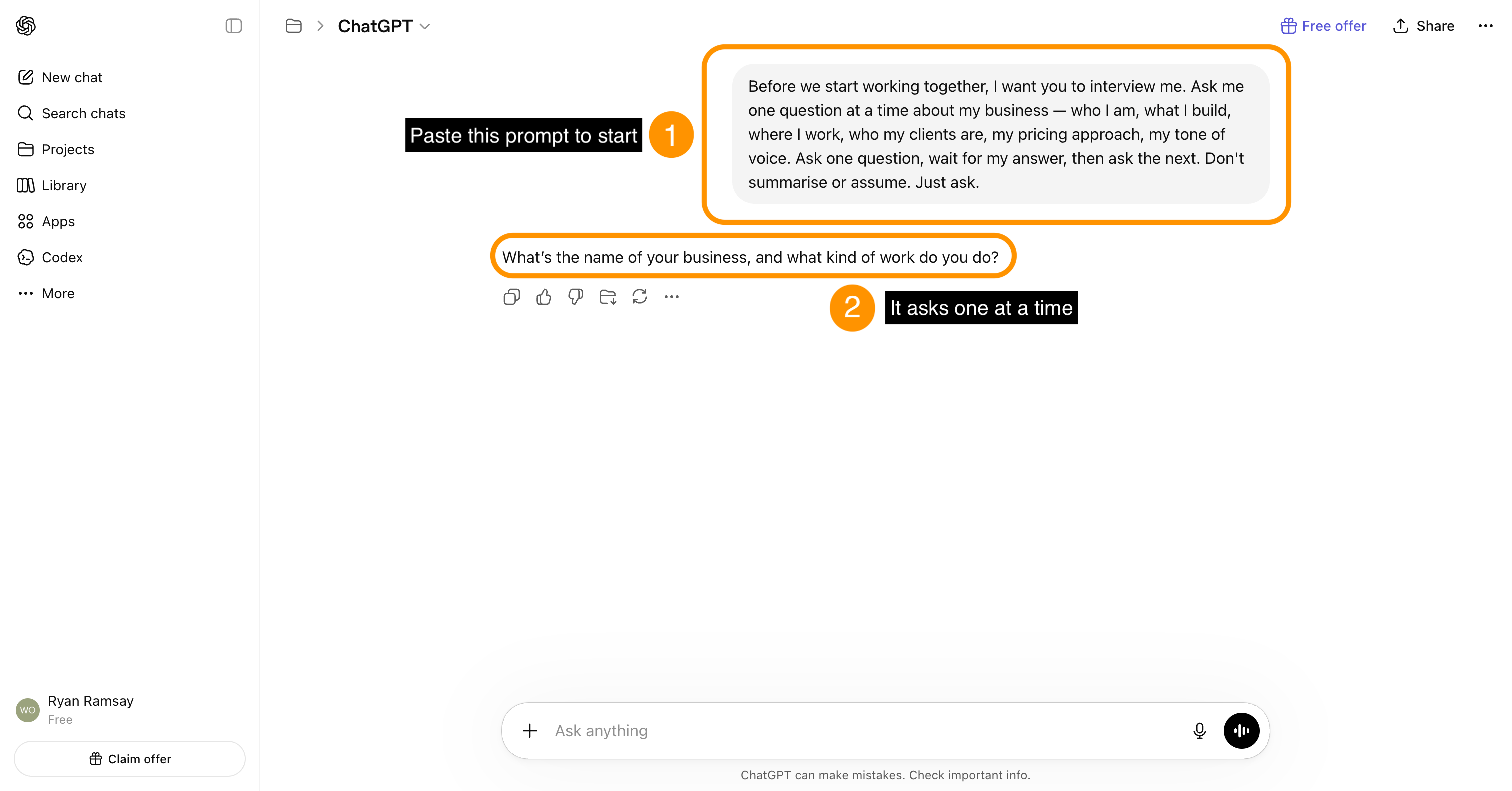
Open the project. Before asking it for anything else, paste this prompt:
'Before we start working together, I want you to interview me. Ask me one question at a time about my business — who I am, what I build, where I work, who my clients are, how I run my pipeline, my tone of voice, my pricing approach, and anything else you need to know to help me with quotes, lead replies, contracts, and admin. Ask one question, wait for my answer, then ask the next. Don't summarise or assume. Just ask.'
It'll ask questions like:
- What kind of building work do you do — residential, commercial, both?
- What region or council area do you operate in?
- What's your typical client like?
- How big's your team?
- What software do you use (Buildxact, Procore, Xero)?
- What's your communication style with clients — formal, casual, somewhere in between?
- How do you price — fixed, cost-plus, mixed?
- What kinds of jobs do you say no to?
Answer honestly. Don't try to make yourself sound polished — answer like you'd answer a mate at the pub. That's how the AI learns to sound like you, not like a marketing brochure.
When it's done, prompt: 'Now summarise what you know about me and my business in 200–300 words. I'll edit anything that's wrong.'
Review. Correct what's off. That summary's the foundation of every conversation from here on.
Step 3 — Save custom instructions
Every project feature has a section called 'Custom Instructions', 'Project Knowledge', 'Personalisation', or 'Gem Instructions' — a text box for durable, always-active context.
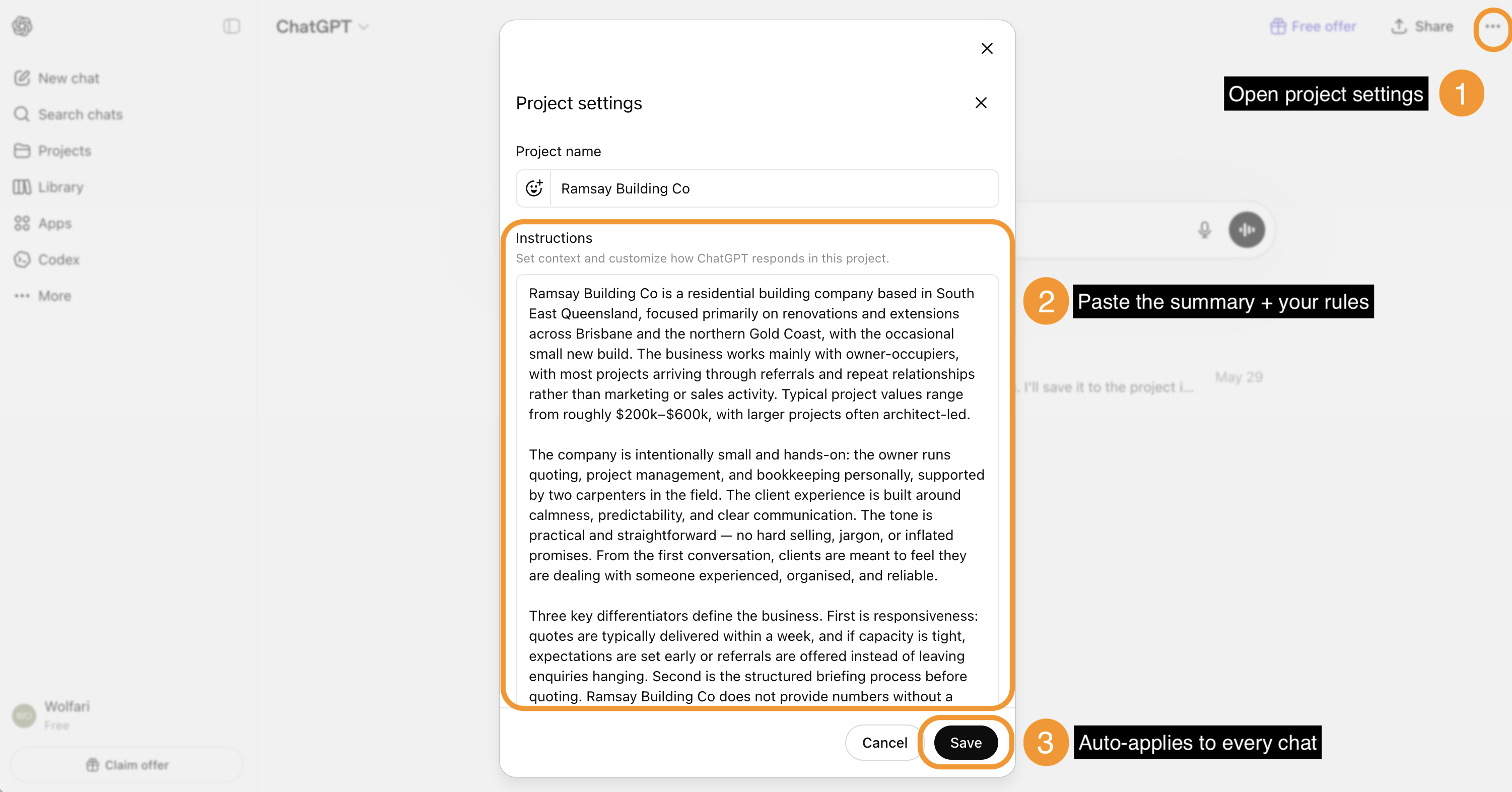
Paste the summary the AI just wrote into that box. Then add anything that should always apply:
- Australian English only. No American spellings, no American jargon. 'Realise' not 'realize'. 'Metres' not 'feet'. 'GST' not 'sales tax'.
- Mention the suburb or council area when it's relevant. Local context matters for quoting and compliance.
- Default tone: friendly but professional. No marketing-speak. No 'transformative solutions', no 'in today's fast-paced industry'. Write the way builders actually talk.
- Never invent facts. If you don't know — a council requirement, a price, a date — say 'I don't know' and ask. Don't fill the gap with plausible-sounding rubbish.
- Keep replies short by default. I'm reading this on a phone on a job site half the time.
Save. Every conversation in this project now starts with the AI already knowing all of that. No more repeating yourself.
Step 4 — Upload your real examples
This is the step that turns a competent AI into one that sounds exactly like you.
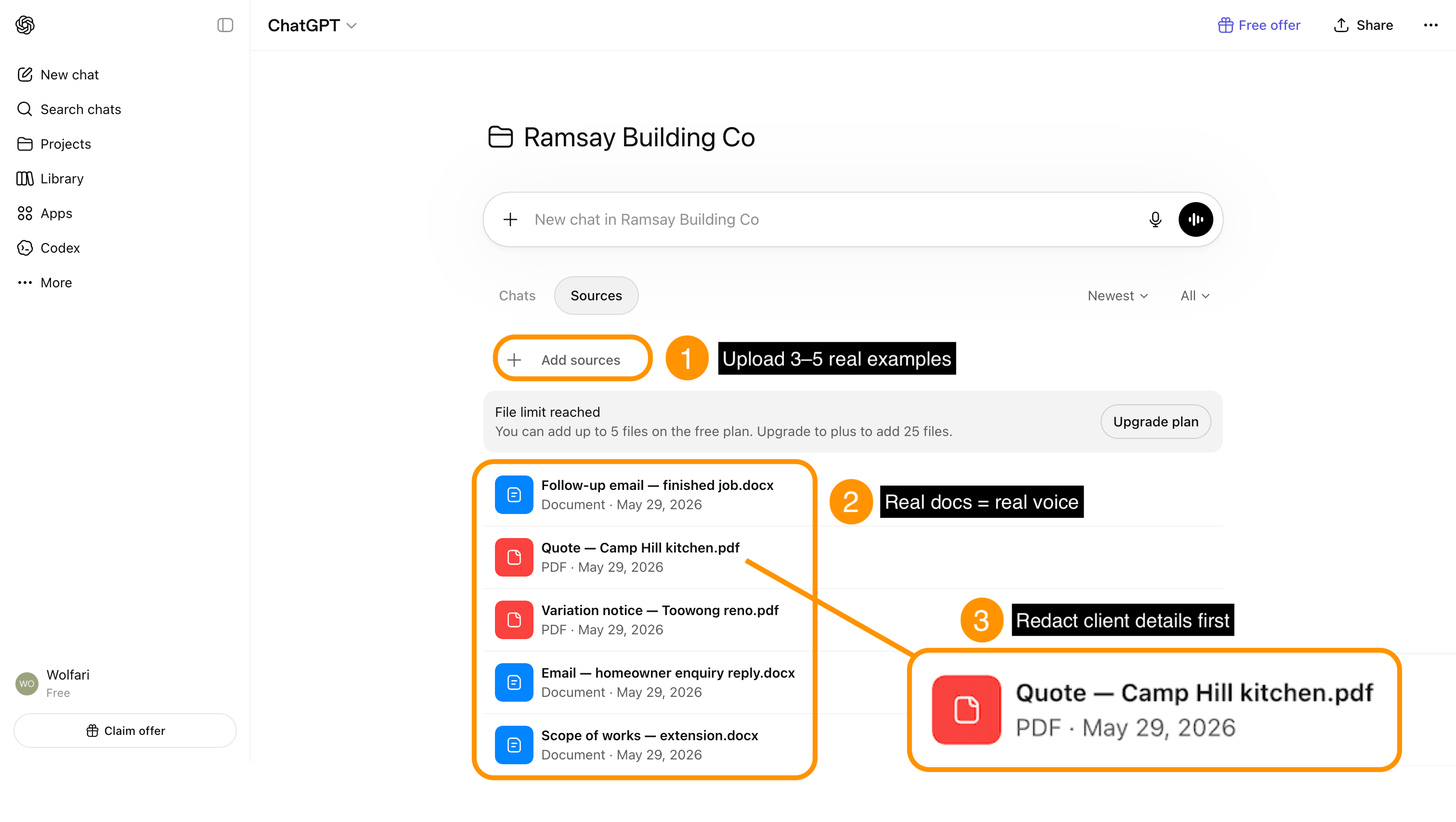
Upload 3 to 5 examples of your actual work:
- A quote covering letter you were proud of
- An email reply to a homeowner enquiry that landed a job
- A scope of works from a finished project
- A variation notice you sent during a build
- A finished-job follow-up email
These are your real voice on your real jobs. The AI uses them to learn how you structure documents, the phrases you actually use, how formal or casual your tone is, how long your emails run, and what you leave out.
Important: redact before you upload. Replace client names with [client name], addresses with [suburb], contract sums with [$X inc GST]. Same redaction principles covered in the AI privacy guide for Australian builders.
Once uploaded, prompt the AI:
'These are my real documents. When you write quotes, emails, or scopes for me, match this tone, structure, and length. Don't make me sound corporate or generic. Sound like me.'
The next quote it writes will be unrecognisable from the generic version. It'll sound like you wrote it after a coffee, not like a chatbot wrote it after reading a marketing textbook.
Step 5 — Add behaviour rules
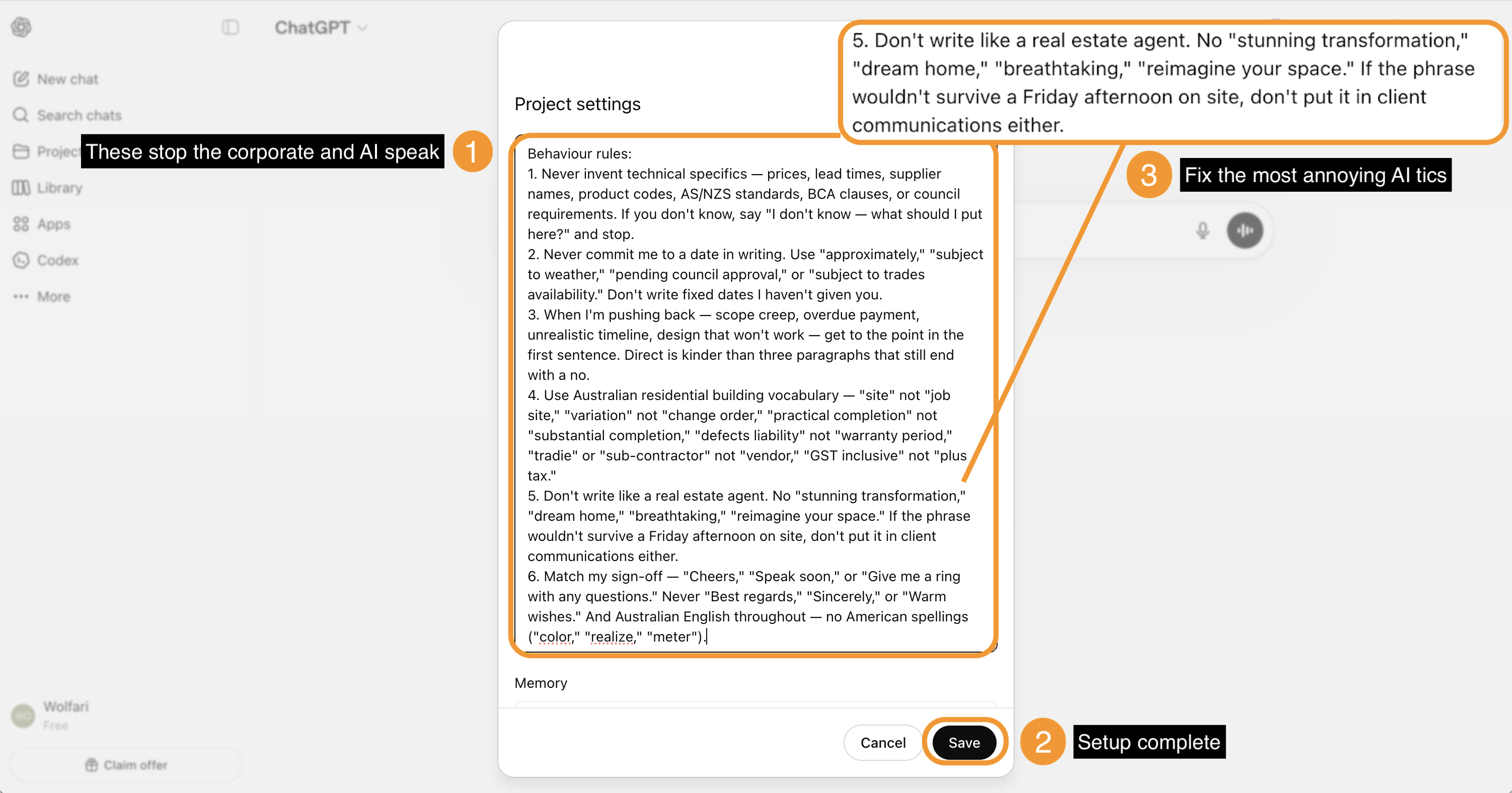
The final step locks in how the AI behaves on the specific things that go wrong when builders use it. Skip this step and you'll end up editing every reply heavily because the AI keeps making the same trade-specific mistakes.
Paste these behaviour rules into your project instructions:
'Behaviour rules:
1. Never invent technical specifics — prices, lead times, supplier names, product codes, AS/NZS standards, BCA clauses, or council requirements. If you don't know, say 'I don't know — what should I put here?' and stop.
2. Never commit me to a date in writing. Use 'approximately', 'subject to weather', 'pending council approval', or 'subject to trades availability'. Don't write fixed dates I haven't given you.
3. Mark anything that can't be priced firm as a PC sum or provisional sum — tiling allowances, kitchen splashbacks, light fittings. Never present these as fixed prices.
4. When I'm pushing back — scope creep, overdue payment, unrealistic timeline, design that won't work — get to the point in the first sentence. Direct is kinder than three paragraphs that still end with a no.
5. Use Australian residential building vocabulary — 'site' not 'job site', 'variation' not 'change order', 'practical completion' not 'substantial completion', 'defects liability' not 'warranty period', 'tradie' or 'sub-contractor' not 'vendor', 'GST inclusive' not 'plus tax'.
6. Don't write like a real estate agent. No 'stunning transformation', 'dream home', 'breathtaking', 'reimagine your space'. If the phrase wouldn't survive a Friday afternoon on site, don't put it in client communications either.
7. Match my sign-off — 'Cheers', 'Speak soon', or 'Give me a ring with any questions'. Never 'Best regards', 'Sincerely', or 'Warm wishes'. And Australian English throughout — no American spellings ('color', 'realize', 'meter').'
Save. Every reply from here is tighter, more accurate, and less likely to land you in a dispute six months later.
Before vs. After: What 20 Minutes Changes
Before setup: Open a fresh chat. Type 'help me reply to this enquiry'. Get a generic, corporate-sounding reply full of phrases you'd never use. Edit it heavily. Wonder if AI was worth the bother.
After setup: Open your project. Type 'help me reply to this enquiry: [paste]'. Get a reply that sounds like you, uses Australian English, asks the right qualification questions, and is the right length. Tweak one sentence. Send.
The difference is the difference between 'this AI thing's overhyped rubbish' and 'this is the most useful 20 minutes I've spent on admin all year'.
Which AI to use (2026 comparison)
| AI | Project Feature | Free Plan Includes Projects? | Best For |
|---|---|---|---|
| ChatGPT | Projects | Yes | Most builders — biggest ecosystem, easiest to start |
| Claude | Projects | Yes (limited) | Best for long documents (contracts, specs, council letters) |
| Google Gemini | Gems | Yes | Best if you already use Google Workspace / Gmail |
| Microsoft Copilot | Agents | Requires M365 subscription | Best if you're already in the Microsoft ecosystem |
Pick the one you already use most. The brand matters far less than the setup. A poorly briefed Claude will give worse answers than a properly briefed ChatGPT.
The full tools comparison for Australian builders is here.
Common mistakes to avoid
1. Using one AI project for everything Set up separate projects for separate jobs. One for 'Quoting', one for 'Client Communication', one for 'Subbies and Suppliers'. Each builds its own memory and stays on-topic.
2. Skipping Step 2 because it feels weird Letting an AI interview you feels backwards. Do it anyway. It's the difference between a useful tool and a frustrating one.
3. Uploading only your best examples Upload typical examples, not award-winning ones. The AI learns to write to your typical level — which is what you actually want for everyday work.
4. Forgetting to update Set a calendar reminder every 3 months to refresh project instructions. Businesses change, prices change, client base shifts. The brief needs to keep up.
5. Treating AI like a search engine Don't ask AI 'what's the current price of timber framing?' — that's a search engine question, and the AI will hallucinate a number. Ask AI 'draft an email to my timber supplier asking for current 90x45 MGP10 pricing for a 200lm order, delivered to [suburb]'. That's an assistant question, and it'll do it well.
How much time this saves
Numbers below come from BuildBrief's field interviews with Australian residential builders running between $500k and $5M turnover:
- 5–10 minutes saved per email reply (especially homeowner enquiries)
- 30–60 minutes saved per quote covering letter and scope write-up
- 15–30 minutes saved per variation notice or change order
- 1–2 hours saved per week on general admin (follow-ups, supplier emails, contractor briefs)
Across a typical 50-week working year, that's 150–300 hours saved — roughly 4 to 8 working weeks per year. The setup cost is 20 minutes. The recurring cost is zero. Compound benefit: several weeks of your life back, every year, for the rest of your career.
Privacy considerations
Briefly: all the privacy rules from the AI privacy guide for Australian builders still apply inside a project. Specifically:
- Turn off model training (ChatGPT: Settings → Data Controls → Improve the model for everyone → Off)
- Redact client details before uploading documents — names, addresses, contract sums
- Don't paste full contracts with real personal details
A project doesn't change privacy — it just makes the AI better at using whatever you do paste.
FAQ
What is a ChatGPT project? A ChatGPT project is a workspace inside ChatGPT that holds custom instructions, uploaded files, and conversation history specific to one purpose. Unlike a regular chat, the project remembers your context across every conversation inside it.
Do I need to pay for ChatGPT Plus to use projects? No. ChatGPT Projects is available on the free plan as of 2026. Claude Projects is also free. Google Gemini's Gems are free with a Google account. Paid plans extend usage limits but aren't required to start.
How long does the 5-step setup take? About 20 minutes for the initial setup. Step 2 (the interview) is the longest single step at around 10 minutes.
Can I have multiple AI projects? Yes, and most builders should. Set up 3–5 separate projects — one for quoting, one for client communication, one for subbies and suppliers, one for admin. Keeping them separate stops contexts bleeding together.
Will the AI share my business information with other ChatGPT users? No. Project content is private to your account. If you also turn off model training (Settings → Data Controls in ChatGPT, or equivalent in Claude/Gemini), your conversations aren't used to train future versions of the AI either.
What if I run more than one business? One project per business. Mixing them confuses the AI and produces output that blends tones and contexts.
How often should I update the project? Every 3 months minimum. Update immediately when business circumstances change — new service offering, new region, new pricing structure, new team member.
Should I set this up on my phone or my computer? Both work and they sync automatically. The Step 2 interview is faster on a computer because typing is faster. Day-to-day use is mostly on the phone.
Do I need to be technical to do this? No. Step 1 is one click. Step 2 is answering questions in a conversation. Steps 3 and 5 are copy-paste. Step 4 is dragging files into the chat window. If you can text, you can do this.
Can I use the same setup on ChatGPT, Claude, and Gemini? Yes. The principles are identical. If you decide to switch tools later, the same 5-step process takes 20 minutes to redo on a different platform.
What if I don't have any examples to upload in Step 4? Skip Step 4 for the first month, then add examples once you've used the project a few times. You can also upload a single email or quote — even one example helps. The more the AI sees, the more your real voice gets baked into the output.
Where to go from here
Block out 20 minutes this week. Walk the 5 steps in order. Don't overthink it.
Once setup's done:
- For specific builder tasks the briefed AI can do, see ChatGPT for Builders: 9 Things You Can Actually Use It for This Week
- For the quote-writing workflow that uses this setup, see How to Write a Residential Building Quote in 12 Minutes Using AI
- For the voice-notes-to-Scope-of-Works workflow, see Voice Notes to Quote: Site Visit Walk-Through Into a Scope of Works
- For the upstream qualification work the AI helps with, see The 12 Questions Every Builder Should Ask Before Quoting
If you want AI pre-briefed for builder-specific intake — homeowner briefs, lead qualification, structured project capture — without any setup, that's BuildBrief. Join the waitlist for early access.
About the author
I'm Ryan Ramsay, founder of BuildBrief, a lead-qualification platform built for Australian residential builders. I'm not a builder myself — I spend my time talking to builders about where their week actually goes, then building tools and writing guides that win those hours back. I've walked through this 5-step setup with builders across Queensland, NSW, and Victoria. It's the single highest-leverage AI step I see builders skip — which is why it gets its own article.
More practical AI guides for Australian builders on the BuildBrief AI Tips and Tricks blog.
New article every fortnight. Join the waitlist to get them in your inbox.